Doula Calendar and Appointment Scheduling | DoulaFlow
Calendar & scheduling

Every visit and every due date, on one calendar

Due dates land on your calendar on their own. Book visits from a client's package, see how many she has left, and get a warning before you double-book.

14 days free. No card needed. Cancel anytime.
app.mydoulaflow.com/calendar
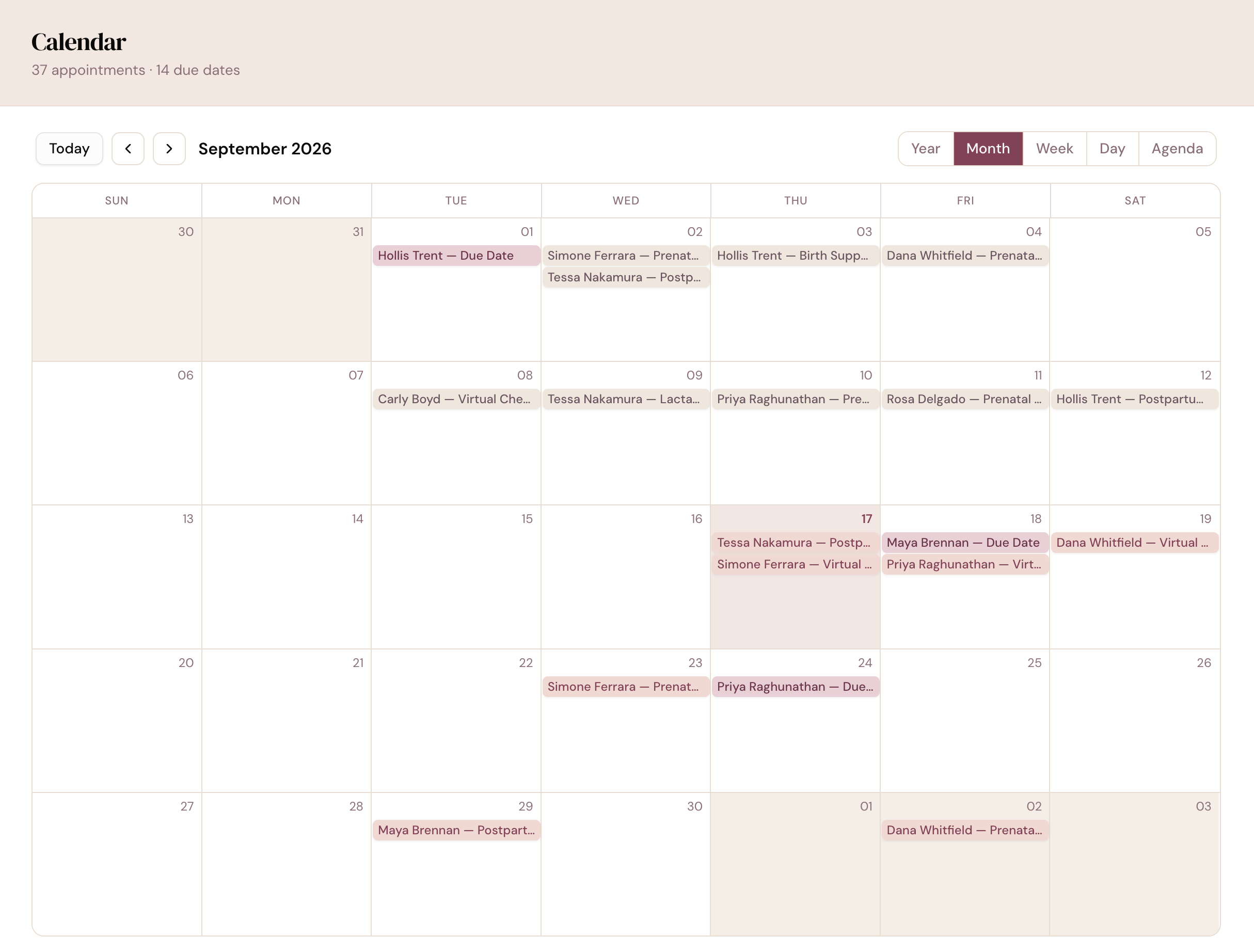
DoulaFlow calendar in month view showing clients' due dates and prenatal, postpartum and virtual visits, with year, month, week, day and agenda views

Where do your due dates live?

In most calendars, a due date is something you type in yourself and hope to keep up to date. Visits live in one place, and the number of visits each client has left lives somewhere else.

Due dates

Due dates show up on their own

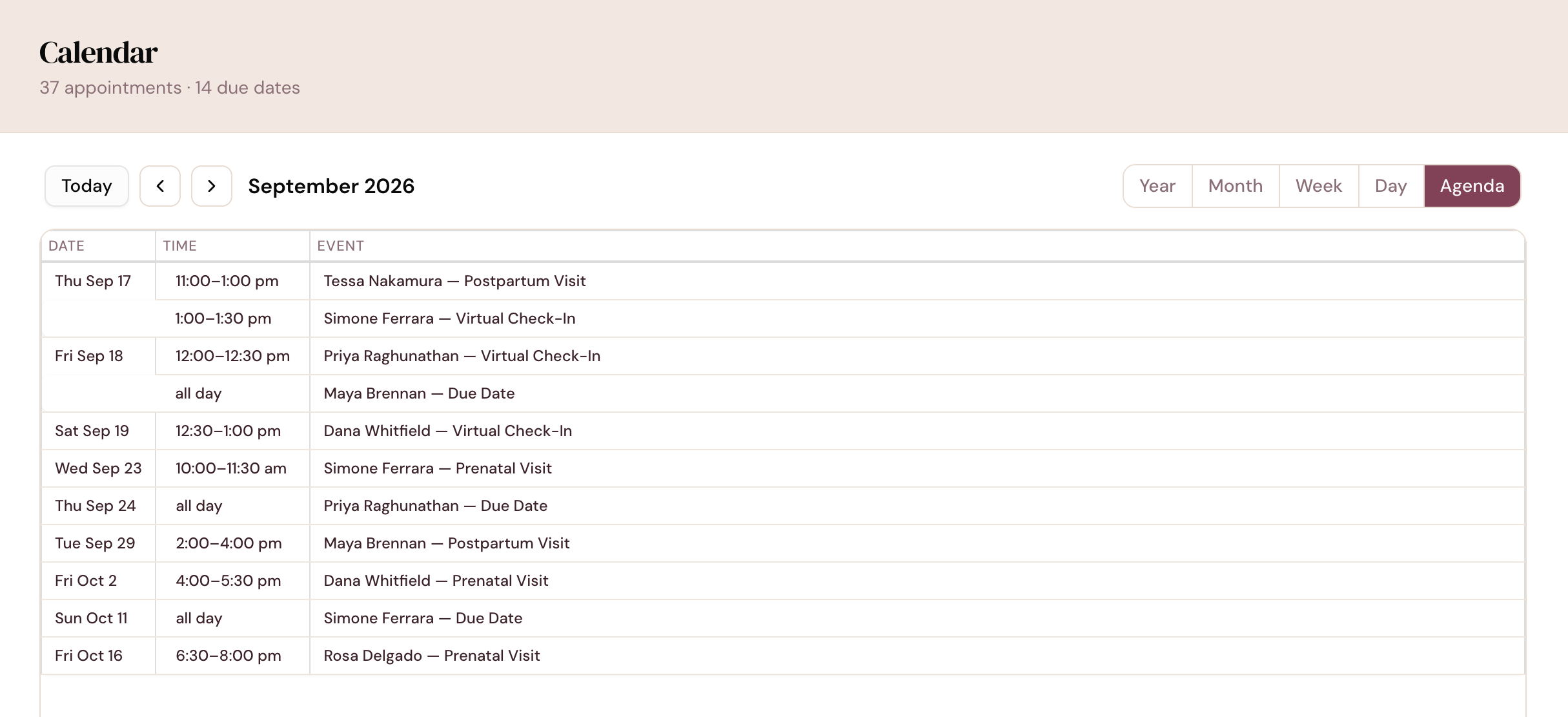
Every client with a due date appears on the calendar as an all-day marker. Switch between year, month, week, day and agenda views whenever you like.

  • Your year at a glance. Due dates show as circles across all twelve months.
  • Agenda on your phone. Phones open straight to the list view.
  • Gone after a loss. A recorded loss removes that due date from the calendar.
app.mydoulaflow.com/calendar
DoulaFlow calendar in agenda view listing upcoming visits and clients' due dates by date and time
Booking

Book from her package

From a client's record, book a visit from her package and see how many of each visit she has left. Need one more? Book it anyway, and it is saved as an extra to bill later.

  • Package or ad-hoc. Book a package visit or an outside appointment.
  • Warnings, not walls. A double-booking asks you to confirm first. Nothing is blocked.
  • A confirmation email goes to your client when you book, unless you turn it off.
Visit types

Visit types that know the phase

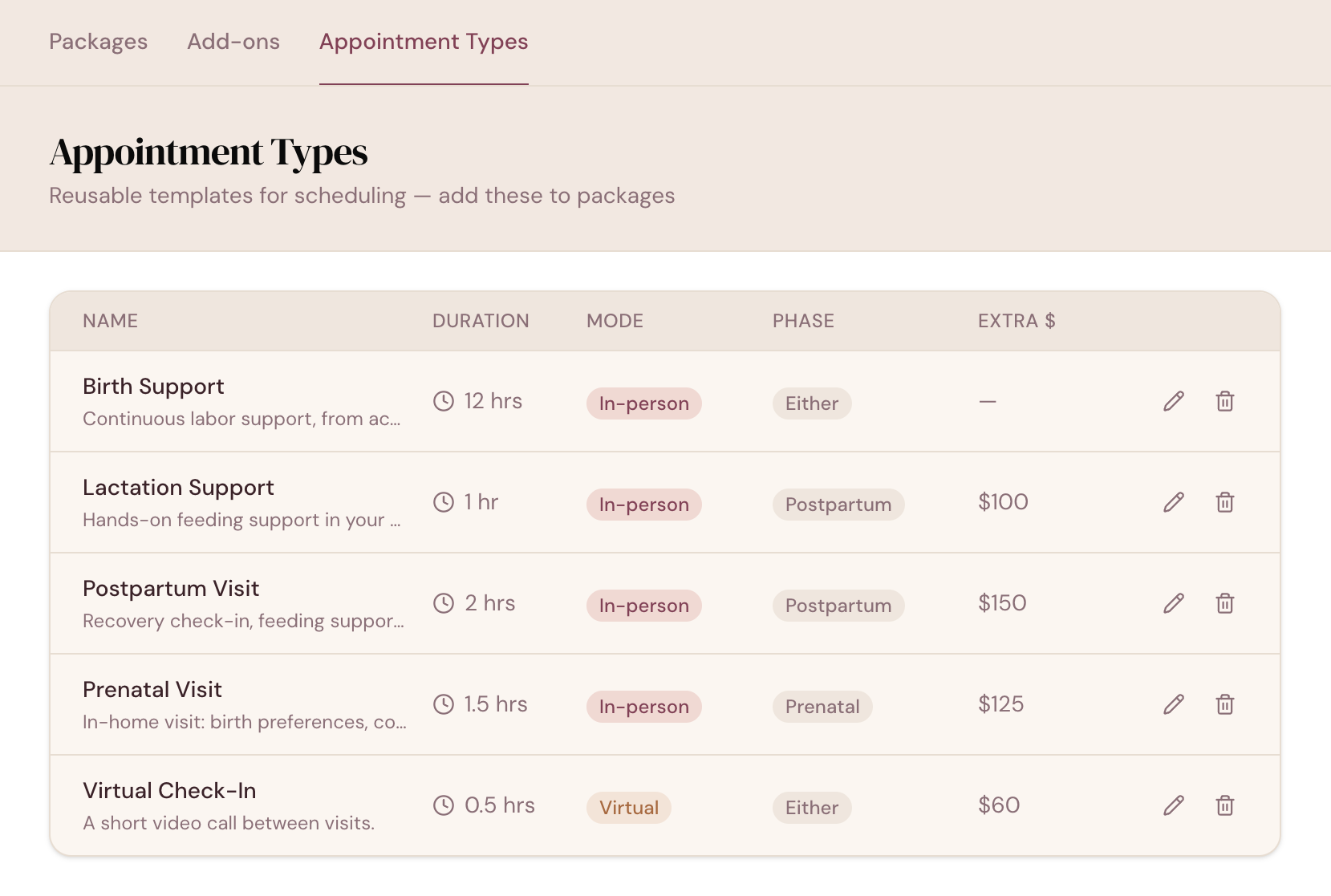
Each visit type has a length, a mode and a phase of care. The phase tells DoulaFlow which visits come after the birth, so Home can remind you when a postpartum visit is due.

  • Lengths in hours, in half-hour steps.
  • In person, virtual or either. Add a location and notes to any visit.
  • A price for extras. Set once, ready for the invoice.
app.mydoulaflow.com/services/appointment-types
DoulaFlow appointment types listing each visit's length, mode, phase of care and extra-visit price
Collectives

One calendar for the whole collective

In a practice with more than one doula, admins can switch on Whole practice to see everyone's visits and due dates, color-coded by doula.

  • Your own clients by default. Turn the whole practice on only when you need it.
  • One timezone. Times show in your practice's timezone, for you and for your clients.
Calendar capabilities

Built around births, not a 9 to 5

Your hours are a guide, never a wall.

Five views

Year, month, week, day and agenda.

Working hours

An optional warning when you book outside them. It never blocks.

Visit status

Mark visits completed, cancelled or no-show.

In her portal

Clients see their upcoming and past visits.

Visits left

Package visits show how many she has used and has left.

For your backup

Your backup gets the client's visits and due date as a calendar file.

What comes with every plan

Unlimited clients

Every plan includes unlimited clients. You are never charged per client.

No cut of your payments

Clients pay you directly through your own PayPal or Venmo. DoulaFlow never touches the money.

Your data stays yours

Ask and we send you a copy of everything: your clients, documents and birth records.

Built with a working doula

Megan runs her own practice and has the final say on everything we build.

No contract

Month to month or yearly. Cancel whenever you like.

Real people answer

Two of us, in Chattanooga, read every message.

Common questions

Can clients book appointments online?

No. You book visits in DoulaFlow, and clients see their upcoming and past visits in their portal.

Does DoulaFlow sync with Google Calendar?

No. DoulaFlow does not currently sync with Google Calendar or other calendar apps.

Does DoulaFlow send appointment reminders?

Your client gets a confirmation email when you book a visit, and you can turn that off. DoulaFlow does not send reminder emails before a visit.

What happens when a client has used all her visits?

You can still book another. DoulaFlow asks you to confirm, then saves the visit as an extra, which you can add to her invoice at the extra-visit price.

Can I see the other doulas' calendars in my collective?

If you are an admin in a practice with more than one doula, you can switch on Whole practice to see everyone's visits and due dates, color-coded by doula.

See every due date in your year.

Add your clients during your free trial and their due dates appear on their own.

14 days free. No card needed. Cancel anytime.