Doula Client Tracking by Birth Stage | DoulaFlow
Clients

Clients by birth stage, not sales stage

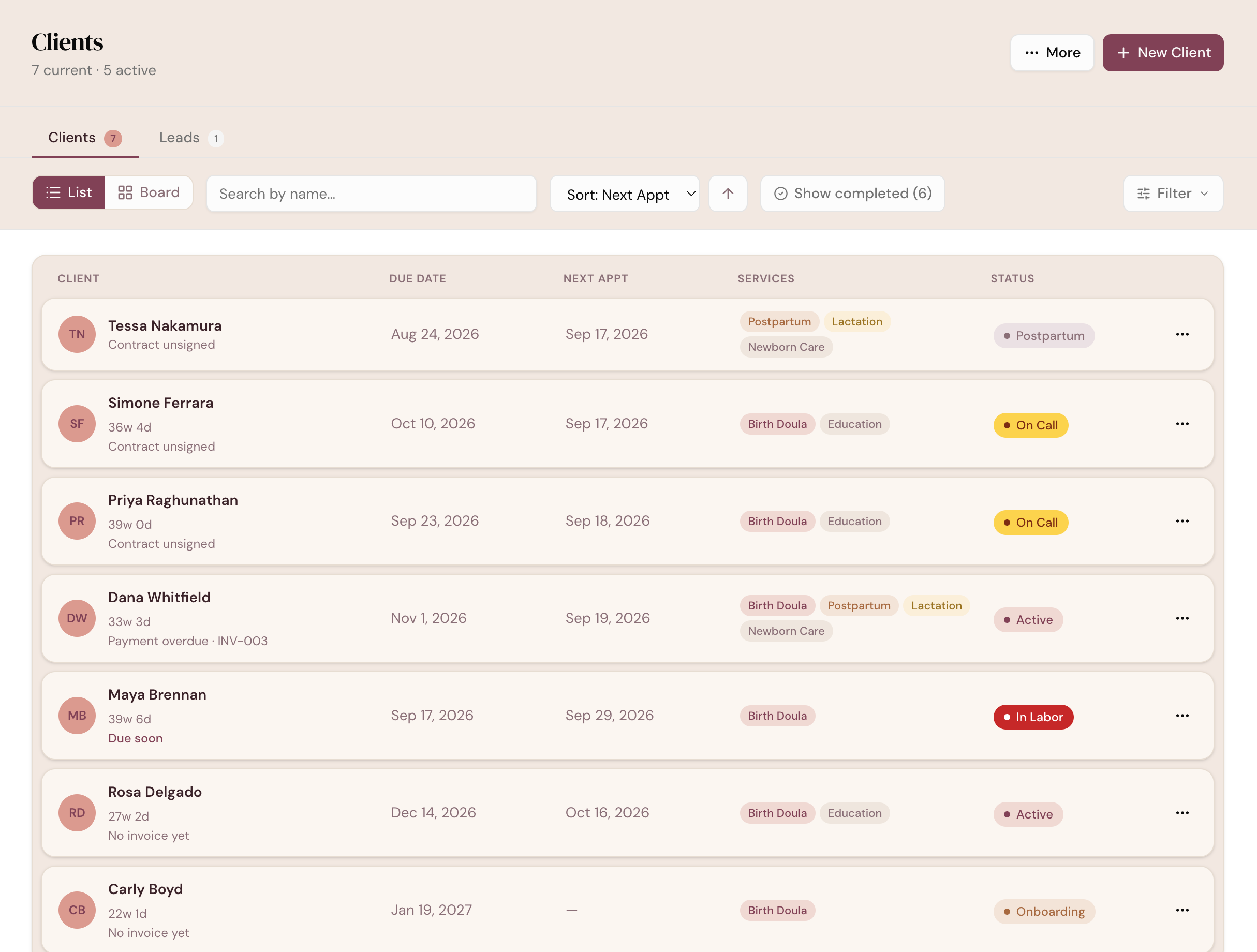
Every client moves through Onboarding, Active, On Call, In Labor, Postpartum and Completed. While she is pregnant, how far along she is sits on her card, and the most urgent thing about her sits right under her name.

14 days free. No card needed. Cancel anytime.
app.mydoulaflow.com/clients
DoulaFlow client list with each client's due date, next appointment, service tags and stage, and a status line under each name such as Contract unsigned or Payment overdue

Why track births in a sales pipeline?

Most CRMs sort people into leads and customers. A doula's clients move through a pregnancy instead, and the week matters more than the deal. Translating one into the other is extra work every day.

Birth stages

Stages that follow the pregnancy

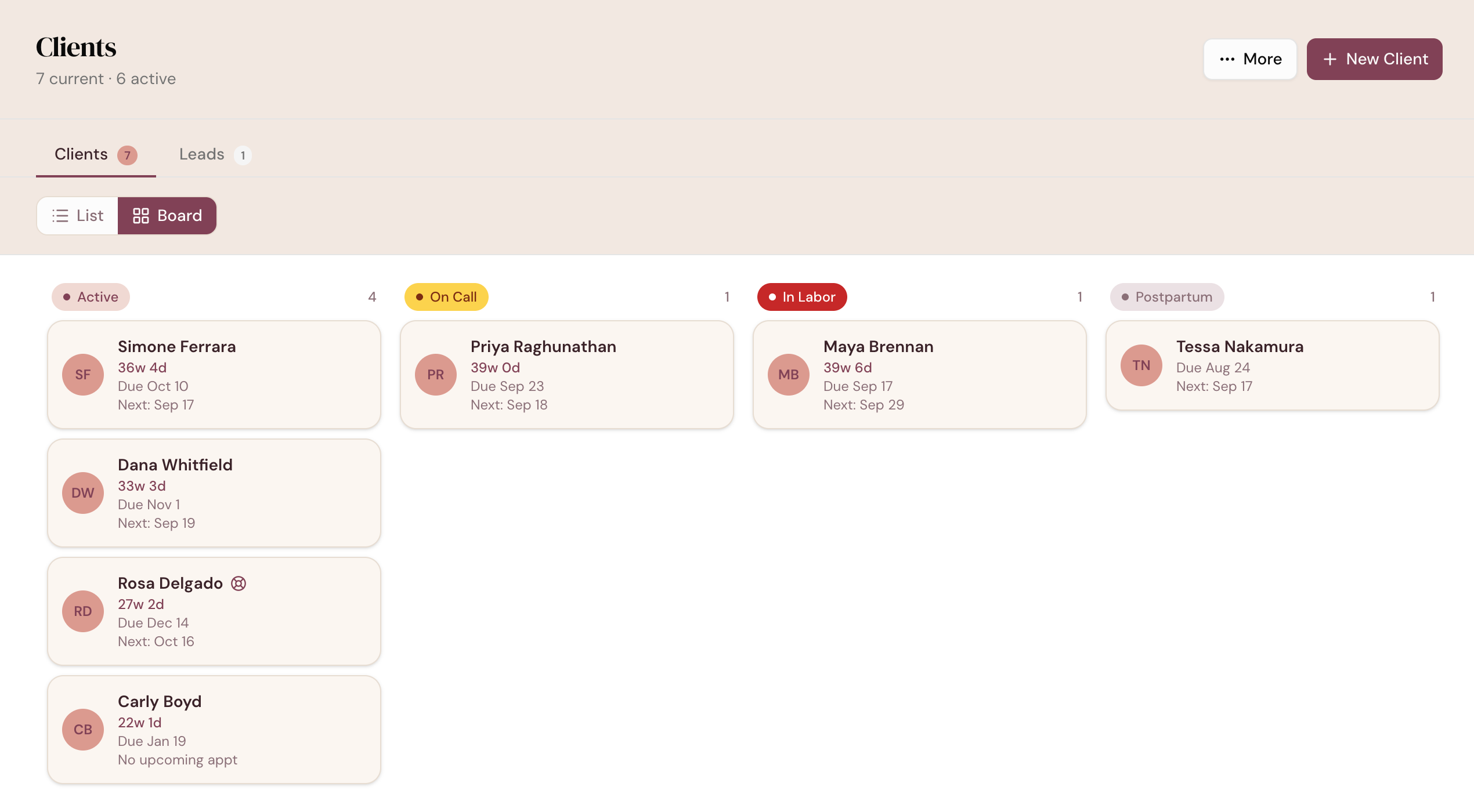
Clients move through Onboarding, Active, On Call, In Labor, Postpartum and Completed. The board shows every stage side by side, sorted by due date.

  • Two moves happen on their own. Assigning a package makes her Active, and the on-call automation moves her to On Call.
  • The rest is your call. You set In Labor, Postpartum and Completed.
  • Board on paid plans. The list view works during your free trial.
app.mydoulaflow.com/clients
DoulaFlow clients board with Active, On Call, In Labor and Postpartum columns, each card showing weeks of pregnancy, due date and next appointment
How far along

How far along, at a glance

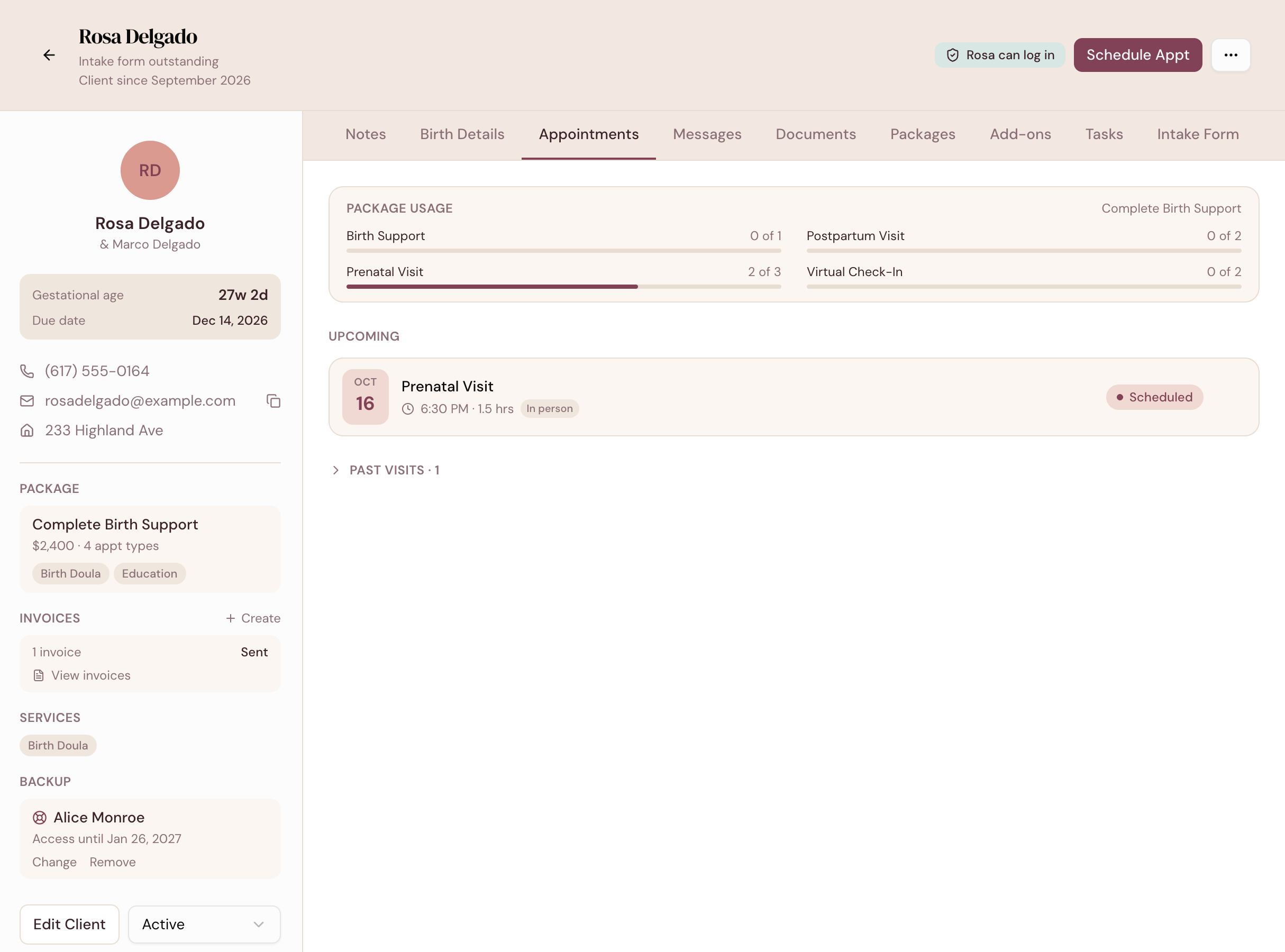
Each client shows how far along she is, like 36w 4d, worked out from her due date. It stops counting at the birth and is hidden after a recorded loss.

  • Due date and next visit on every card and row.
  • One record for everything. Contact details, package, invoices, services and backup together.
  • Tabs for the rest. Notes, birth details, appointments, messages, documents and intake.
app.mydoulaflow.com/clients
A DoulaFlow client record showing gestational age and due date, contact details, package, invoices, services and backup doula
What she needs

The one thing she needs next

Under each client's name, DoulaFlow shows her single most urgent open item. It comes from the same place as your Home dashboard, so the two always agree.

  • Real work, not labels. Contract unsigned, payment overdue, no visit scheduled.
  • Good news too. Contract signed or payment received, once nothing is open.
  • Birth first. In labor and past due always come before paperwork.
Leads

From consult to client in one record

Book a consult and DoulaFlow adds a lead with the consult on your calendar. When she signs on, onboard her from that same record, so nothing gets typed twice.

  • Three quick steps. Her details, her package, then a review.
  • Find anyone fast. Search by name, and sort by due date, next visit or stage.
Client capabilities

Everything about a client, in order

Small details that keep a full caseload easy to read.

List or board

Switch views any time. Your choice is remembered.

Completed tucked away

Past clients stay out of your list until you show them.

Delete and restore

Remove a client by mistake and bring her back.

Save to contacts

Add a client to your phone's contacts from her record.

Backup at a glance

An icon on the card shows which clients have a backup.

In a collective

An admin can reassign a client, with a warning about open invoices.

What comes with every plan

Unlimited clients

Every plan includes unlimited clients. You are never charged per client.

No cut of your payments

Clients pay you directly through your own PayPal or Venmo. DoulaFlow never touches the money.

Your data stays yours

Ask and we send you a copy of everything: your clients, documents and birth records.

Built with a working doula

Megan runs her own practice and has the final say on everything we build.

No contract

Month to month or yearly. Cancel whenever you like.

Real people answer

Two of us, in Chattanooga, read every message.

Common questions

Can I drag clients between stages?

No. You change a client's stage from the menu on her row or from her record. DoulaFlow also moves her to Active when you assign a package, and to On Call if you turn that automation on.

Can I rename or add stages?

No. The stages are Onboarding, Active, On Call, In Labor, Postpartum, Completed and Inactive, plus Lead for people who have booked a consult.

How is gestational age worked out?

From the client's due date, counted as 40 weeks. It shows as weeks and days, like 36w 4d, stops at a recorded birth, and is hidden after a recorded loss.

Is the board view in the free trial?

The board is part of paid plans. During the free trial you use the list view, which has search, sorting and filters.

Can I import my existing clients?

Yes. You can import clients from a CSV file of up to 1,000 rows, including birth records, and DoulaFlow has built-in guidance for eDoula exports.

Set up your clients the way a pregnancy works.

Add or import your clients during your free trial.

14 days free. No card needed. Cancel anytime.