Doula Invoicing Software: Get Paid Before On-Call | DoulaFlow
Invoicing & payments

Get paid before you go on call

Split each invoice into a deposit and a balance, and set the balance due at a week of pregnancy. Clients pay you directly through your own PayPal or Venmo. DoulaFlow never touches the money.

14 days free. No card needed. Cancel anytime.
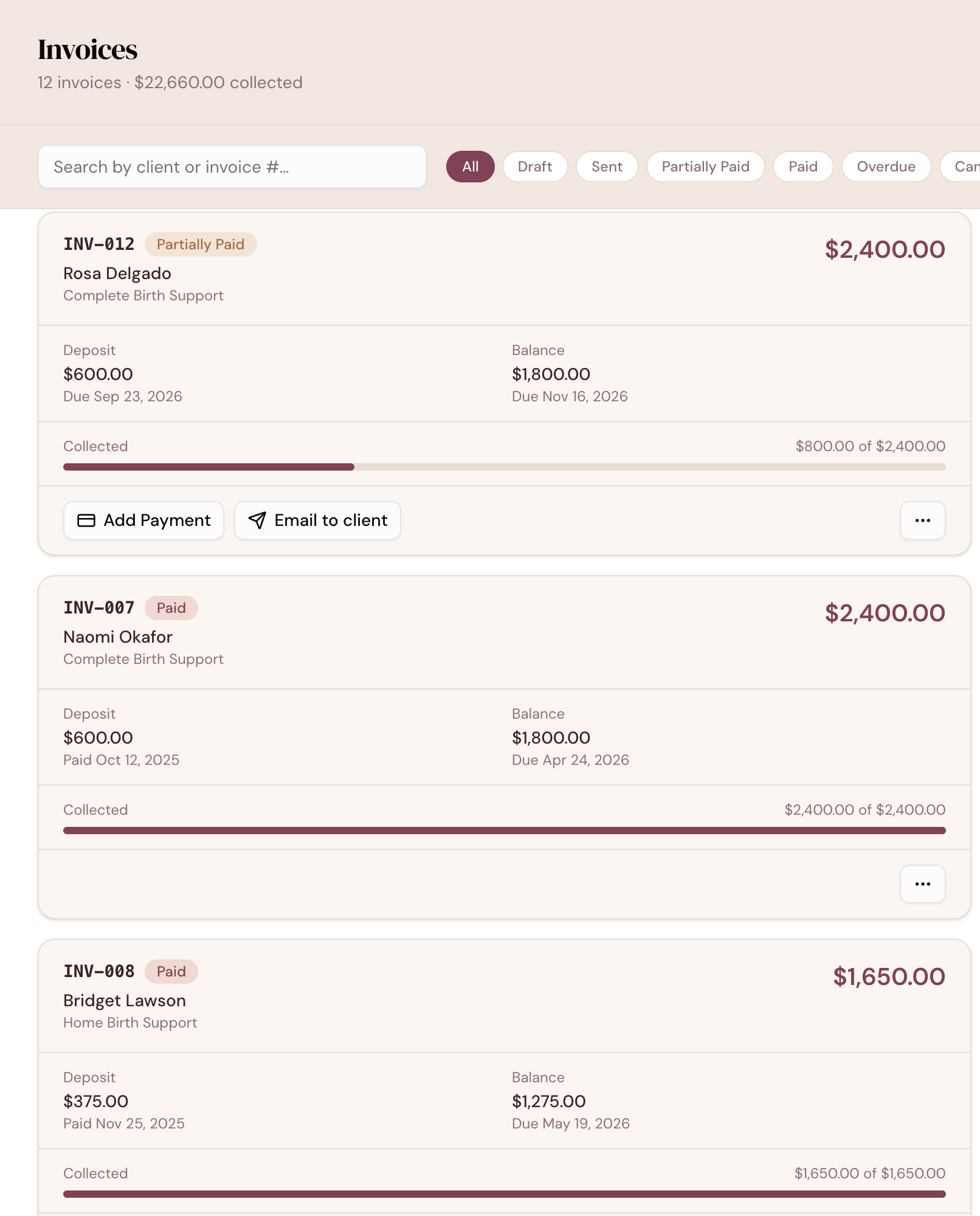
app.mydoulaflow.com/invoices
DoulaFlow invoices list showing each invoice's status, deposit and balance with their due dates, and how much has been collected

Why wait until you are on call to get paid?

Many doulas end up chasing a balance around the birth, when they are busiest. Asking twice feels awkward. And every client's 36 weeks lands on a different date on the calendar.

Due dates that follow the pregnancy

A balance due at 36 weeks, worked out for you

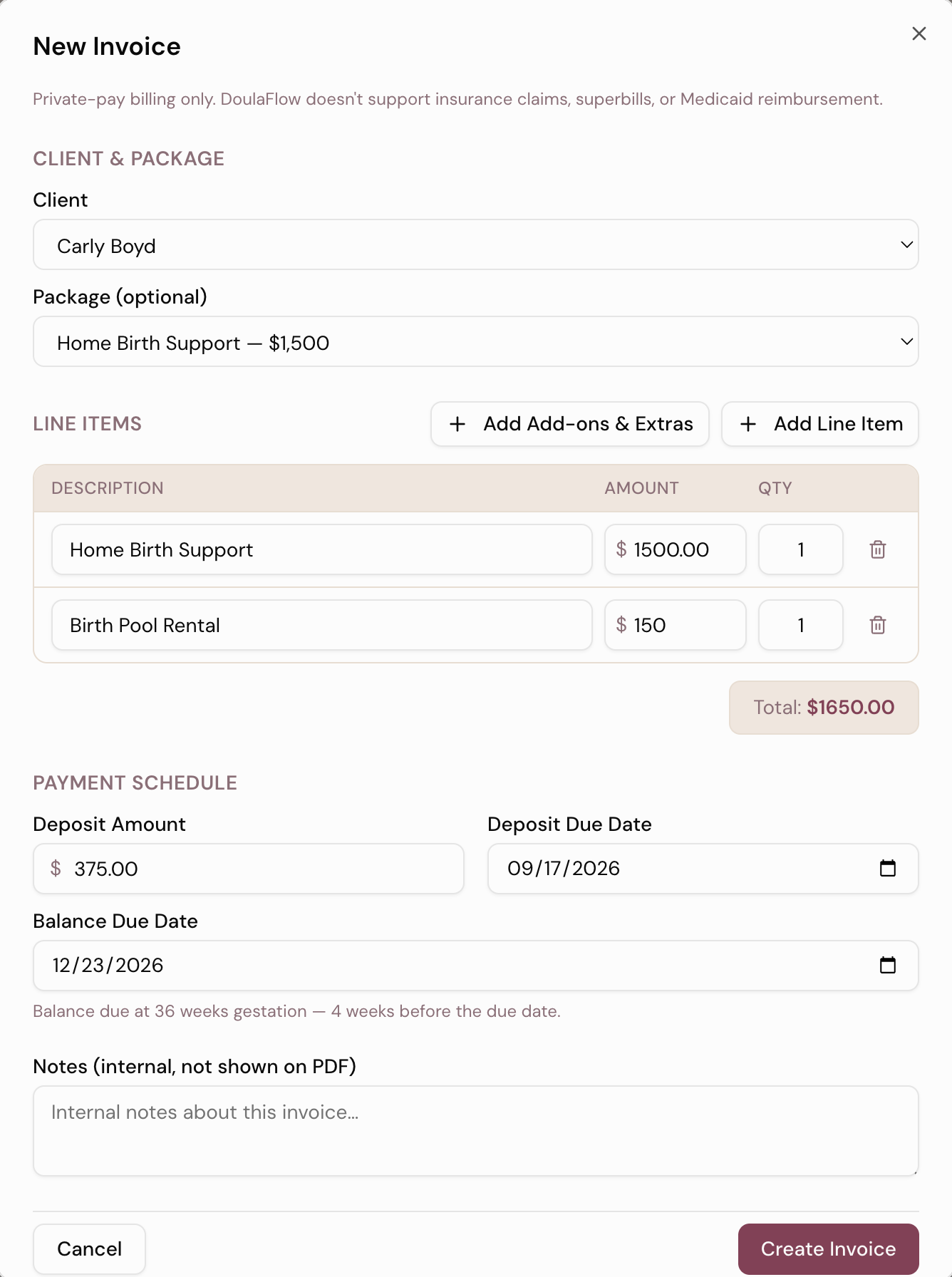
Turn on the balance-due suggestion and each new invoice fills in the date from that client's due date. 36 weeks is the default. Pick any week, or a number of days after the invoice is created.

  • Always editable. Change the date for any client who needs different terms.
  • Never in the past. A client already past that week gets today's date.
  • Deposit and balance apart. Each has its own amount and its own due date.
A new DoulaFlow invoice with a package and an add-on as line items, a deposit amount and due date, and a balance due date set at 36 weeks gestation
Paid directly

Clients pay you, not us

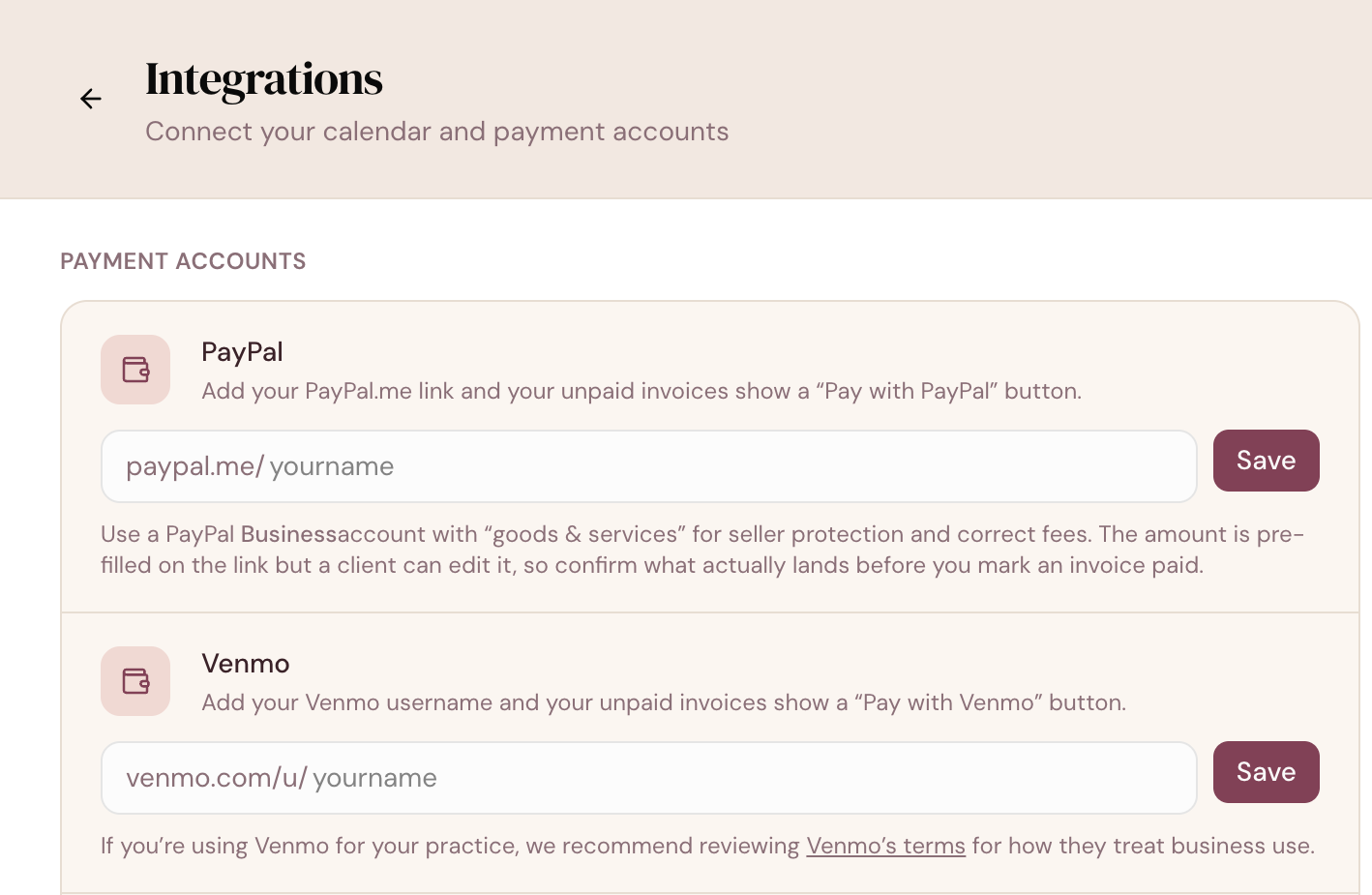
Add your PayPal.me link or Venmo username and choose one as your default. Unpaid invoices then carry a Pay button in the PDF, the invoice email and your client's portal.

  • No cut, ever. The money goes straight to your account. DoulaFlow never processes it.
  • She enters the amount. The button opens your PayPal or Venmo page, beside the balance she owes.
  • Paid another way? Record cash, Zelle, a check or a card payment yourself.
DoulaFlow payment settings with fields to add a PayPal.me link and a Venmo username
Reminders

One reminder. Not a nag.

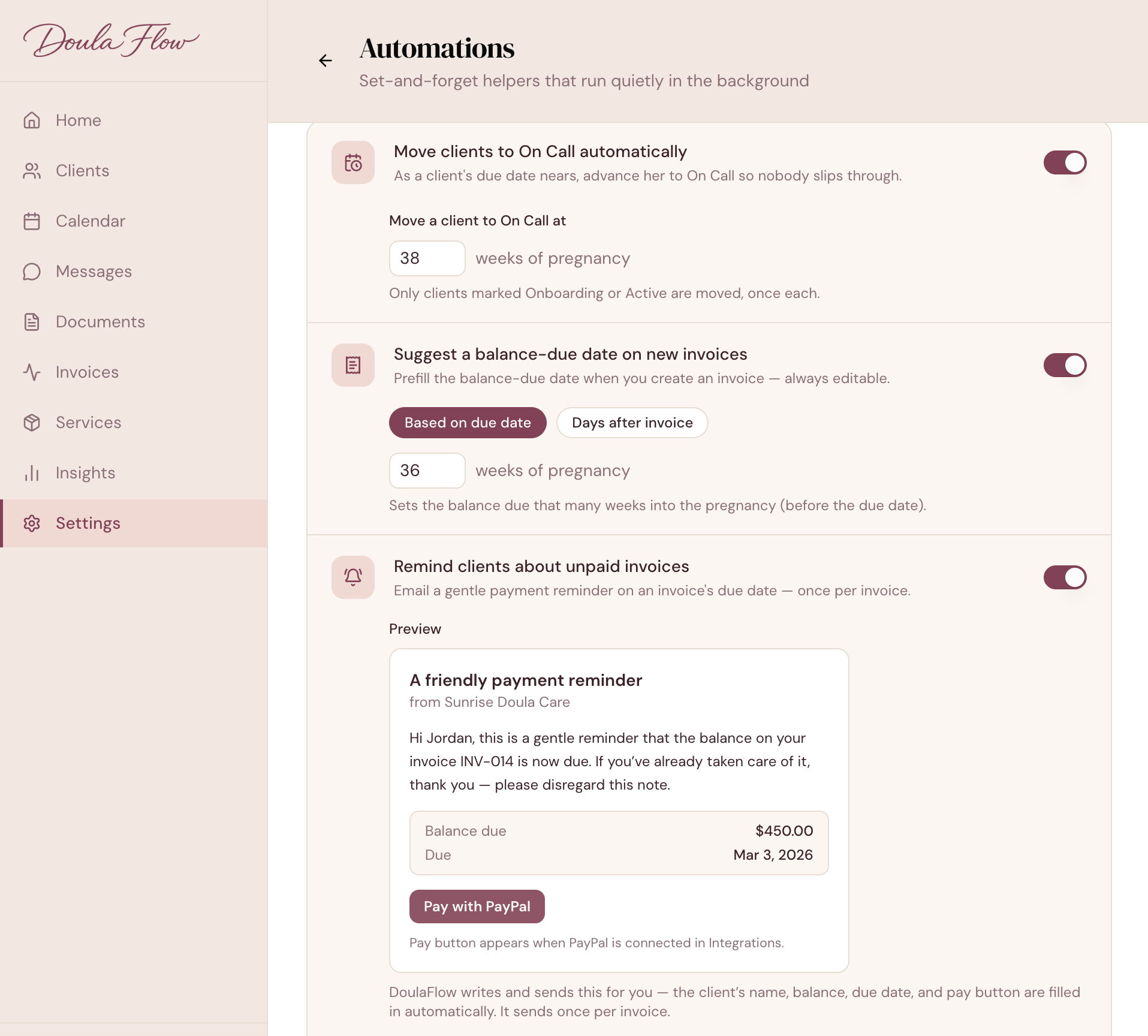
Switch reminders on and DoulaFlow emails your client once when a balance falls due, with the Pay button in it. It sends one per invoice and never repeats on its own.

  • Starts off. Nothing is sent until you turn it on.
  • Send one yourself. Remind a client any time from the invoice.
  • No double-up. The automatic reminder waits if you sent one in the last seven days.
app.mydoulaflow.com/settings/automations
DoulaFlow automations settings with the unpaid-invoice reminder switched on and a preview of the reminder email, showing the balance due and a Pay with PayPal button
Know where you stand

See what is paid and what is not

Every invoice shows its status, how much has been collected and what is left to pay. Filter your invoices by draft, sent, partially paid, paid, overdue or cancelled.

  • A collected bar on every invoice, so you can see progress at a glance.
  • Status moves with payments. Record the deposit and the invoice shows partially paid.
  • Last reminded. Each unpaid invoice shows when you last asked.
Invoicing capabilities

Built for how doulas bill

The details behind every invoice you send.

Your own invoice numbers

Each doula's invoices are numbered in order, starting at INV-001.

Built from her package

Choose her package and the line item and deposit fill in.

Sent with the PDF

Email the invoice to your client with the PDF attached.

Deposit and balance

Two amounts and two due dates, tracked separately.

Bring past invoices

Import your invoice history from a CSV, matched to your clients.

In a collective

Each doula keeps her own invoices and her own numbering.

What comes with every plan

Unlimited clients

Every plan includes unlimited clients. You are never charged per client.

No cut of your payments

Clients pay you directly through your own PayPal or Venmo. DoulaFlow never touches the money.

Your data stays yours

Ask and we send you a copy of everything: your clients, documents and birth records.

Built with a working doula

Megan runs her own practice and has the final say on everything we build.

No contract

Month to month or yearly. Cancel whenever you like.

Real people answer

Two of us, in Chattanooga, read every message.

Common questions

Does DoulaFlow take a cut of my payments?

No. Clients pay through your own PayPal or Venmo, so the money goes straight to you. DoulaFlow never processes or holds payments and adds no fee.

Can clients pay online during my free trial?

PayPal and Venmo Pay buttons are part of paid plans. During the free trial you can still create invoices, send them to clients, and record payments yourself.

How does the 36-week due date work?

When the balance-due suggestion is on, a new invoice fills in the balance-due date from the client's due date, set to the week of pregnancy you choose. 36 weeks is the default. You can also base it on a number of days after the invoice is created. The date is set when you create the invoice, and you can change it at any time.

How many reminders does DoulaFlow send?

One automatic reminder per invoice, on or after the balance-due date, and only if you have turned reminders on. You can send more yourself from the invoice whenever you choose.

Can I bill insurance or Medicaid with DoulaFlow?

No. DoulaFlow is for private-pay billing. It does not support insurance claims, superbills or Medicaid reimbursement.

Can I import my past invoices?

Yes. You can import invoices from a CSV file. Each invoice is matched to an existing client by name, and an amount already paid comes in as one payment.

Get paid before you go on call.

Create and send invoices during your free trial.

14 days free. No card needed. Cancel anytime.